
Create a Wallet
Start on a trusted device and understand seed phrases and private keys before creating or importing.
Creation guide →imtoken Multi-chain Wallet
A multi-chain wallet, blockchain network and Web3 knowledge hub from imtoken
Understand multi-chain assets, network selection, sending and receiving, DApp connections, token approvals, network fundamentals and wallet security in one practical framework. Every on-chain action starts with verifying the network, target and permission.
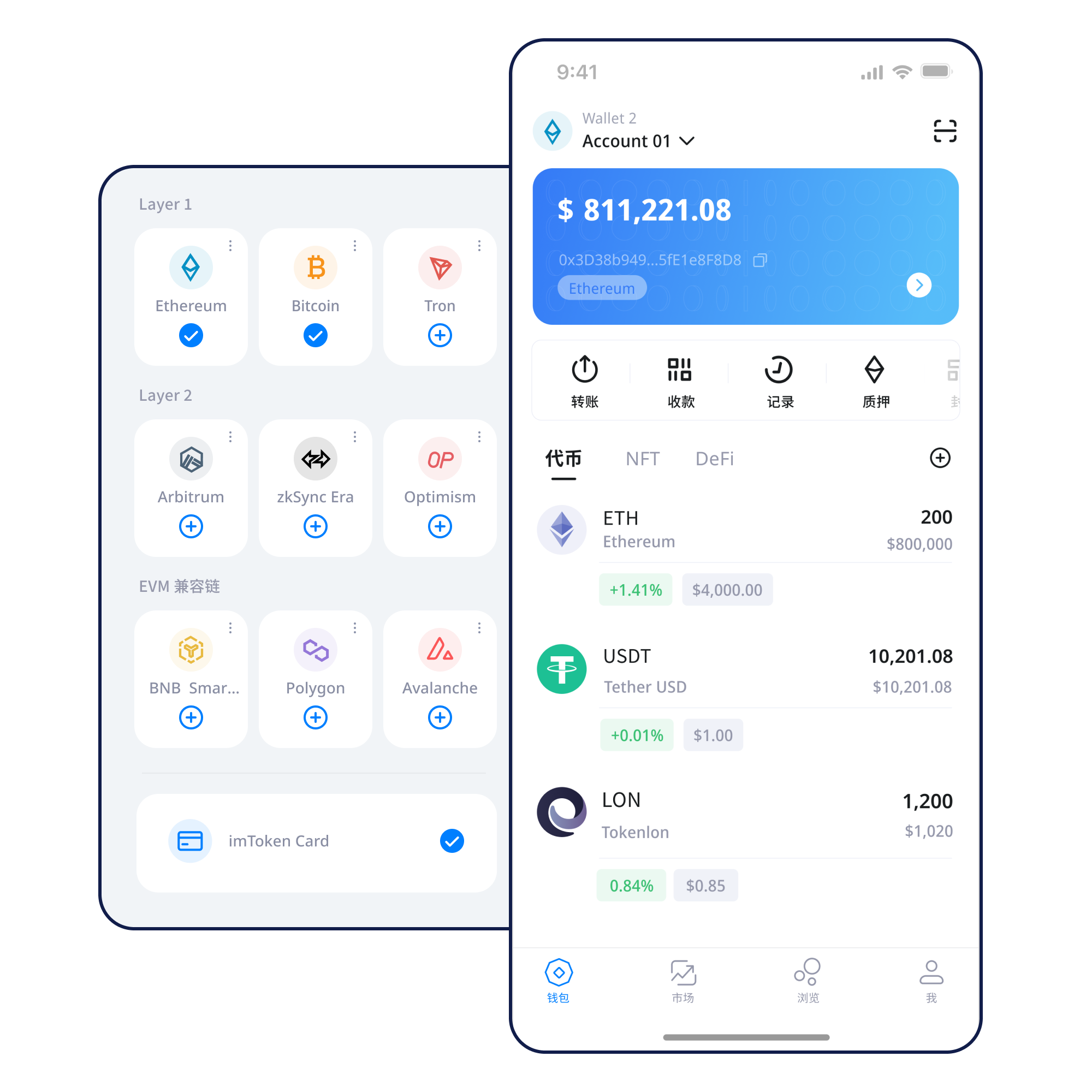
Start on a trusted device and understand seed phrases and private keys before creating or importing.
Creation guide →Keep the seed phrase offline and away from screenshots, cloud sync and messaging apps.
Backup principles →Verify the address, network and token contract together.
Receiving checks →Check the address, network, amount and gas, then keep the transaction hash.
Transaction checks →A connection is not blanket permission. Review each signature separately.
DApp connection guide →Wallet capabilities
A balance, a network, a transaction and an approval are different layers of information. imtoken explains how they fit together in a real workflow.
Multi-chain assets
Assets with similar names can exist on different networks, and similar address formats do not make those networks identical. Check chain context, token contracts and transaction evidence.
Explore multi-chain networks →
Send & Receive
Each field has a separate meaning. After submission, use the transaction hash on the correct network to verify confirmation status.
Send and receive guide →imtoken App
Manage networks, review balances and history, and verify the current network before signing.
About the App →imtoken Web
Every signature, transaction and approval still needs separate review after a DApp is connected.
Using imtoken Web →
Keep seed phrases and private keys under your own control. imtoken staff will not request them.
Security center →Explore blockchain networks
One wallet can access several networks, but every chain has its own state, fee market and confirmation model. Cross-chain movement requires a separate bridge or protocol flow.
Multi-chain guide →
Public chains use distributed nodes to validate and propagate transactions. Block height and confirmation count help users interpret status.
Public-chain basics →
EVM networks can use similar address formats while keeping separate chain IDs, gas assets and contract deployments.
Understand EVM →
Moving assets between layers can involve bridges, message passing and waiting periods. A wallet balance alone does not tell the whole story.
Layer 2 basics →Gas reflects execution resources and can change with congestion and complexity. Use the transaction hash to distinguish pending, successful and failed states.
Gas & confirmation guide →Wallet journey
Download access always goes through the dedicated download page and starts with a user action.
Use a trusted device and avoid exposing sensitive information through remote-control software.
Keep the seed phrase offline and never disclose a private key or verification code.
Verify the asset network, recipient support and DApp requirements.
Check address, network, amount and gas, and use small transfers to learn the process.
Inspect DApp requests before signing and review permissions you no longer need.
Web3 & DApps
Connecting a wallet does not mean every later signature should be approved. Review the domain, network, target, allowance and action for each request.
Complete Web3 guide →Security
Seed phrases and private keys determine wallet control and should remain with the user. Phishing sites, support impersonation, malicious signing, broad approvals, clipboard substitution and shared devices can all create risk. imtoken staff will not request a seed phrase, private key or verification code. Check the address, network and amount before sending, and continue reviewing every signature and approval after connecting to a DApp.
Open the Security CenterAcademy · Featured
Before clicking “create wallet”, understand addresses, seed phrases, private keys, networks, gas, transaction hashes, DApps and approvals. These concepts tell you whether a request is only displaying information, switching a network, creating a transaction or asking for broader permission.
Start learning →Learn why transactions need blocks and confirmations.
Read →Connect gas, contract calls and token approvals.
Read →Review base-layer relationships, bridges and waiting periods.
Read →Identify spenders, allowance scope and stale permissions.
Read →Protect credentials, devices and each transaction decision.
Read →Understand core terms through practical wallet scenarios.
Read →Ethereum Staking Basics
Validators participate in Ethereum consensus under protocol rules. Rewards depend on network conditions and validator performance rather than a fixed annual return. Withdrawals and exits should also be understood separately.
Ethereum staking knowledge →Product & Security Updates
Check the network, token contract and on-chain record.
Use the transaction hash to keep verifying status.
imtoken staff will not request wallet secrets.
Consider revoking permissions you no longer need.
FAQ
Control depends on the private keys capable of producing valid signatures. A seed phrase can typically derive those keys, so both should remain under the user’s control.
No. imtoken staff will not ask for a seed phrase, private key or verification code. Treat any such request as high risk.
EVM networks can share similar account formats while using different chain IDs, gas assets and on-chain states. Similar addresses do not make the networks interchangeable.
Verify the receiving address, network and asset type together. For tokens, check the contract address rather than relying only on the name or icon.
Gas is the network resource cost for executing a transaction or contract call. It is not simply a wallet-interface fee.
It is a durable identifier for looking up a transaction on the relevant blockchain explorer, including status, block information and failure details.
Use the transaction hash to confirm whether it was broadcast, then check network congestion, fee conditions and explorer status before taking further action.
A connection alone generally does not transfer assets, but later signatures, transactions or approvals can have on-chain effects. Review each request independently.
imtoken
Download access always goes through /download.html and starts with a user action.